SpoonCMS: A minimalist .Net Core CMS - version 1.01 released
I posted about this side project I have been working on for a while here and got some great feedback from you guys before: https://www.reddit.com/r/dotnet/comments/7zqtft/spooncms_a_minimalist_net_core_cms_for_devs_who/
Wanted to give an update that I made some performance improvements, bug fixes as it's gotten more use, and added Postgres as a datastore option in addition to LiteDB. Any other feedback is welcome, seems to fill a good niche for a very light content management solution.
Some background:
The goal of this project came to solve the constant small updates to freelance projects as I was doing. I didn't want a CMS that would take over my application and not let me code in pure .Net anymore. I also didn't want to keep making small updates and redeploying. It's more developer focused, but unfriendly to normal users if needed. Can use the built in admin, or run totally headless.
Some highlights:
- After installing the package, less than10 lines of code for base setup
- It is built to be very simple and basic. You put content in, you get content out with a few small features around it.
- Can use claims or auth attributes to secure the admin that already work with your current auth systems.
- Can use LiteDB (data file) or Postgres (RDBS using Marten) for content storage. Other providers being considered as time goes on.
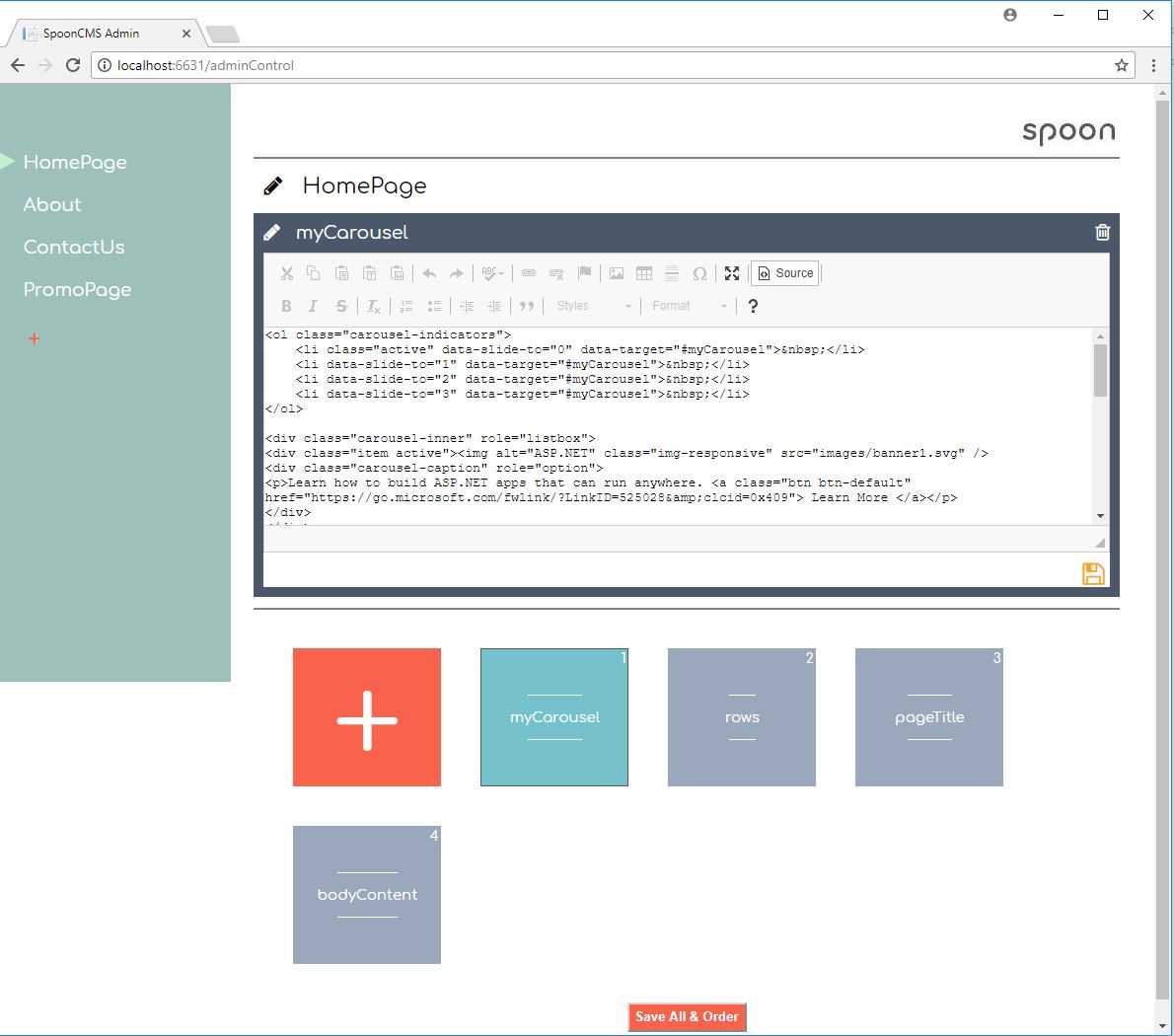
Here is a screenshot of the admin for an example project I created.
A simple example of how I would use SpoonCMS to load content onto my Home Page. The controller would look like:
public class HomeController : Controller { private readonly ISpoonData _spoonData; public HomeController(ISpoonData spoonData) { _spoonData = spoonData; } public IActionResult Index() { Container container = _spoonData.GetContainer("HomePage"); PageViewModel vm = new PageViewModel(); vm.headerContent = container.GetItem("HeaderContent").Value; vm.bodyCotentBlock = container.GetItem("BodyContentBlock").Value; vm.rightRail = container.GetItem("RightRailContent").Value; vm.leftNav = container.GetItem("LeftNavLinks").Value; vm.footer = container.GetItem("FooterContent").Value; return View(vm); }
And my view could look like this:
<body> <div id="header-block">@Html.Raw(Model.headerContent)</div> <div id="body-copy">@Html.Raw(Model.bodyCotentBlock)</div> <div id="right-rail">@Html.Raw(Model.rightRail)</div> <div id="left-nav">@Html.Raw(Model.leftNav)</div> <div id="footer">@Html.Raw(Model.footer)</div> </body>
Let me know how it works out for you!


0 comments:
Post a Comment